
 Join our Discord
# ⚡ HEPA PERFORMANCE OPTIMIZER (hepa-fpsmenu)
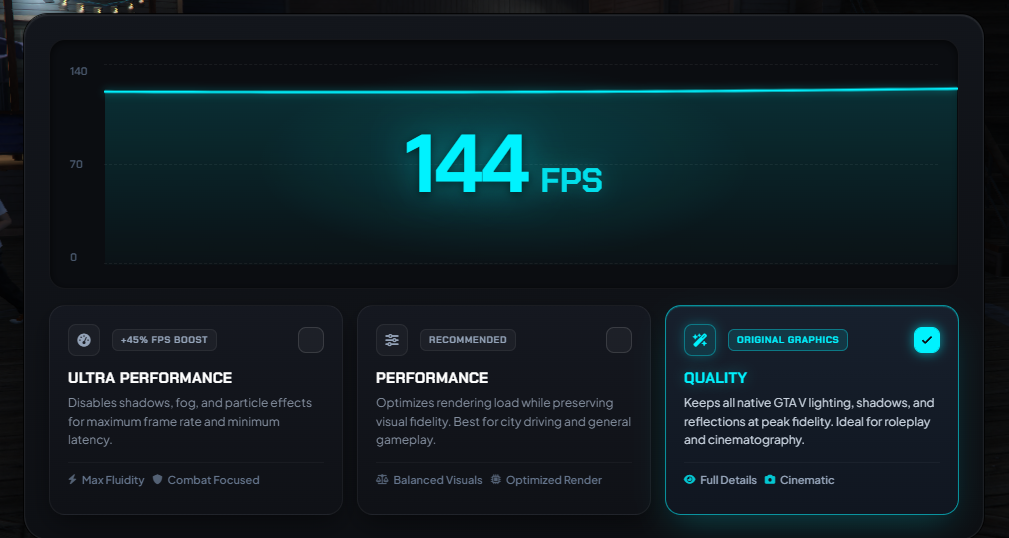
Boost your FiveM FPS and eliminate stutter with **Hepa Performance Optimizer**! Designed with a bespoke, ultra-sleek cyan telemetry UI, this standalone performance menu gives players instant control over visual presets while keeping server performance at an absolute **0.00ms idle**.
---
### 🌟 Key Features
- **🚀 0.00ms Resmon Idle:** Zero resource usage when idle or in Quality mode.
- **⚡ 3 Tuned Performance Presets:**
- **Ultra Performance (PVP / Competitive):** Clears atmospheric fog, bloom, and haze (`cinema` filter), aggressively optimizes LOD models, and removes ambient traffic/pedestrians for maximum FPS gain.
- **Performance (Balanced):** Optimizes rendering distance and shadows while preserving city visual fidelity.
- **Quality (Original):** Restores 100% native GTA V graphics and lighting.
- **💾 KVP Client Persistence:** Automatically saves player settings on their client; remembers the selected profile across server restarts and reconnections.
- **🌍 15 Pre-Configured Languages:** Full multi-language support (EN, TR, DE, FR, ES, PT, IT, NL, PL, RU, AR, ZH, JA, KO, CS) with dynamic live NUI translation!
- **📊 Real-time Bezier Telemetry:** Beautiful, animated oscilloscope-style spline curve with live FPS counter.
- **⌨️ Multi-Command Aliases:** Configurable aliases (e.g. `/fpsmenu`, `/fps`, `/setfps [mode]`).
- **🛡️ 100% Standalone:** Works seamlessly on QBCore, ESX, or any custom framework without dependencies.
---
### 📦 Installation
1. Drag and drop `hepa-fpsmenu` into your server's `resources` directory.
2. Add `ensure hepa-fpsmenu` to your `server.cfg`.
3. Open `config.lua` to customize commands, keybinds, and default language.
---
### 🔗 Support & Community
- **Store:** [hepa.tebex.io](https://hepa.tebex.io)
- **Discord:** [discord.gg/vTAqs9FPtt](https://discord.gg/vTAqs9FPtt)